
NX Camera Info Pro can recover camera usernames and passwords that are stored in a supported Nx Witness database. You need an authorised, readable database or backup; recovery does not require the original server to be running.
Can you recover a CCTV camera password this way?
This workflow fits a camera that was configured in an Nx Witness system and whose saved credentials are present in your database copy. The camera itself can be offline while you inspect the file. A serial number, an IP address or a screenshot of the camera list alone does not contain the stored password.
- Use a supported Nx Witness SQLite database, such as a readable
ecs.sqlitecopy or supported site backup. - Install NX Camera Info for Windows, Linux or macOS and open the file in Free to check the camera inventory.
- Use Pro for password reveal and credential exports. Free keeps passwords hidden.
- Keep the original backup unchanged. You do not need to upload it to this website.
Start with what you are trying to recover.
A camera may have its own login that Nx Witness uses to connect to it. That saved camera credential is what this feature reads. An Nx local user, an Nx Cloud account and your NX Camera Info Pro account are different identities. This tool does not recover their passwords from account hashes.
A common scenario is an inherited installation with a working Nx system but no camera password register. Obtain a fresh backup from the site administrator, or use an existing consistent copy you are authorised to inspect. You do not need to reset the cameras merely to see what credentials the database contains.
How to recover the saved camera credentials.
- Install the app for your platform. Choose Open database → Local file and select the database. Free can first confirm that the camera inventory is readable.
- Activate an existing Pro licence through Account & licence. Pro purchase availability is shown on the comparison page.
- Filter by a camera’s name, saved address, model or server. Review the credential recovery status before interpreting the password field.
- Choose Reveal passwords to inspect recoverable saved values. Hide them again before sharing your screen.
- If you need a retained report, use Export as and deliberately include passwords. Store that export where only the appropriate people can access it.
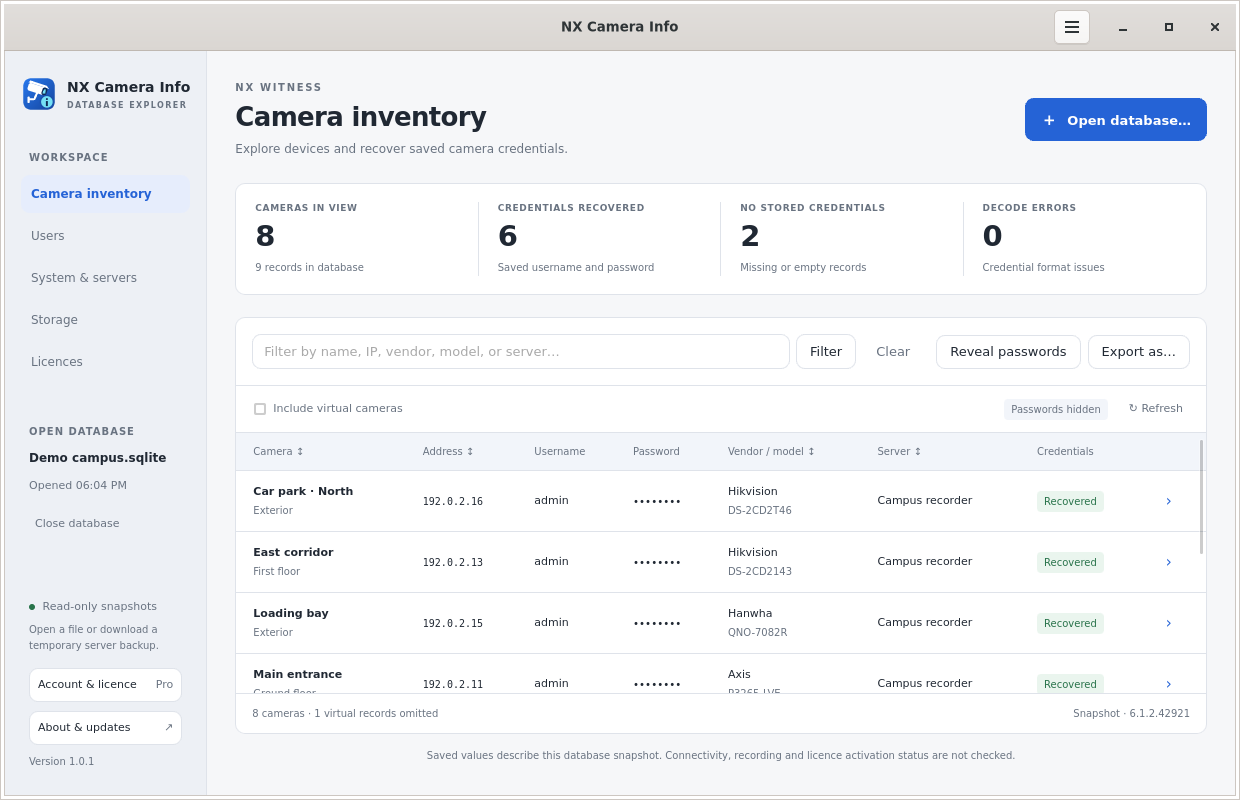 Camera inventory in Pro
Why is the password missing, or why does it not work?
A camera can have no stored credential record, an explicitly empty password, or a record that cannot be decoded. These are different outcomes. The reader uses the explicit camera credential when present; only an absent explicit property falls back to the stored default credential. It does not substitute a different value to hide a decode failure.
Even a structurally recovered password is only the saved value. Someone may have changed the camera password after the backup was made. The app does not attempt logins, test connectivity or claim the camera is online. Check any access you need through the site’s authorised maintenance process.
What if you do not have an Nx Witness backup?
If the system still runs, ask its authorised administrator for a consistent backup, or use Pro’s server or Nx Cloud connection with an account that has backup rights. See which database to open and cloud backup permissions.
If there is no readable database containing the credential, this recovery method has no saved value to reveal. Use the camera manufacturer’s authorised recovery or reset process instead. Network discovery may help identify a device, but finding its address is not the same as recovering its password. The CCTV tool comparison explains those different tasks.
Keep the useful result, without spreading secrets.
Use a masked inventory for general handover documents and a restricted credential report only when required. Full reports can contain other sensitive information, including Nx licence keys, regardless of the camera password setting. A backup itself should also be handled as sensitive data.
If your next step is to work with the physical devices, see the SADPTools site-visit workflow. For export structure and command-line examples, read CSV and JSON reporting.