
NX Camera Info is an Nx Witness tool for recovering saved CCTV camera information from a supported database or backup. Free gives you a searchable camera inventory. Pro adds saved camera passwords, exports and detailed site reports. It runs on Windows, Linux and macOS.
What are you trying to do?
| Your task | Start with | What it gives you |
|---|---|---|
| Recover CCTV camera information | NX Camera Info Free and a supported Nx Witness backup | Saved camera names, IP addresses, manufacturers, models and server assignments. |
| Recover a saved camera password | NX Camera Info Pro and a database containing recoverable camera credentials | The stored camera username and password, which may need checking if the backup is old. |
| Document or migrate an Nx Witness site | NX Camera Info Pro | CSV/JSON reports, account roles, servers, storage configuration and Nx licence records. |
| Discover cameras on the current network | SADPTools and access to the authorised network | Supported device discovery and checks to compare with your saved inventory. |
| Watch video or administer the running Nx system | The Nx Witness client | The VMS’s normal viewing, recording and system administration functions. |
| Regain camera access without a saved password | The camera manufacturer’s authorised recovery or reset procedure | A supported route to restore access. Requirements depend on the device and manufacturer. |
Recover CCTV information from a backup.
Suppose you inherit a site with 40 cameras and a recent Nx Witness configuration backup, but no current camera register. Open a copy of the backup in NX Camera Info Free. Search by camera name or saved address, filter by model, and check which server each camera belongs to. You can inspect this information on your laptop without restoring the original server.
With Pro, build a fuller handover reference: saved server addresses and software versions, user roles, recording storage paths and Nx licence keys where the database contains them. Export a masked report for the installation team and keep any credential-bearing report separately. The site handover guide explains what to capture.
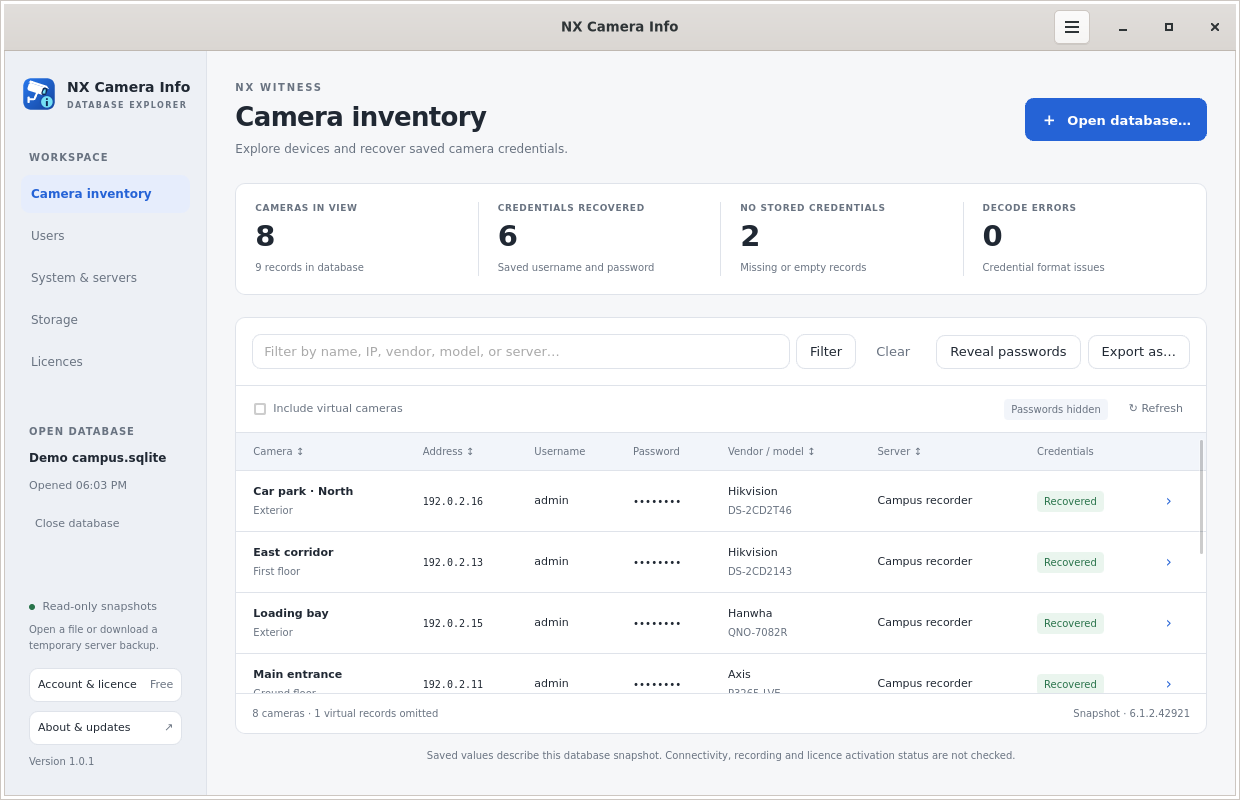 Free camera inventory
Recover a CCTV camera password that Nx Witness saved.
A camera login is separate from the account you use to sign in to Nx Witness. If the database contains a supported, recoverable camera credential, Pro can reveal that saved value. You do not need the original Nx server to be running to read a local backup.
First use Free to check that the camera is present in a readable database. Then activate Pro, filter to the camera and choose Reveal passwords. A missing or undecodable credential cannot be reconstructed simply by buying a licence. An old saved password may also differ from the camera’s current password.
Follow the CCTV camera password recovery guide for the full workflow and what to do when no usable credential is available. NX Camera Info does not guess passwords, bypass camera authentication or recover Nx user account passwords.
Work from a backup when the recorder has failed.
If a server no longer starts, a surviving database can still tell you how the system was configured. Open a readable copy on another computer, build a camera list, record the saved server details and identify gaps before replacing hardware. This is useful preparation for restoration; it is not the restoration itself.
Configuration backups do not contain recorded video. Repairing a damaged disk or recovering footage requires a different workflow. Start with recovering CCTV information after server failure, then use the migration checklist if the hardware is changing.
Take the saved inventory on site with SADPTools.
A database describes a saved configuration. Network discovery helps you investigate what is reachable now. Our sister app SADPTools can import an NX Camera Info report into a site workspace and perform supported discovery and device checks on an authorised network.
For example, export the old camera inventory, import it into SADPTools and compare the recorded addresses with devices discovered during a site visit. Investigate missing devices and changed addresses before updating the handover. The two apps have separate roles; importing a record does not prove that the camera or its saved password still works. See the combined recovery and discovery workflow.
What do you need before you start?
- Permission to inspect the system. Work with the site owner or authorised administrator.
- A supported Nx Witness SQLite database or backup. Keep the original safe and inspect a copy. This is not a universal reader for every NVR backup format.
- A suitable computer. Desktop and Pro CLI builds cover Windows and Linux on Intel/AMD 64-bit or ARM64, plus macOS on Intel or Apple Silicon.
- The right edition. Free opens local files and shows the camera inventory. Password reveal, exports, site reports and nearby/Nx Cloud backup connections need Pro.
If you do not have a local file, Pro can request a backup from a reachable Nx server or an accessible Nx Cloud site. Your Nx account still needs backup permission; merely seeing a shared site is not enough. Read the Nx Cloud backup guide before planning that route.
Database inspection happens on your computer. Camera databases and Nx credentials are not uploaded to this licensing website. Read the privacy details for how accounts, purchases and device licensing are handled.